 EN
EN

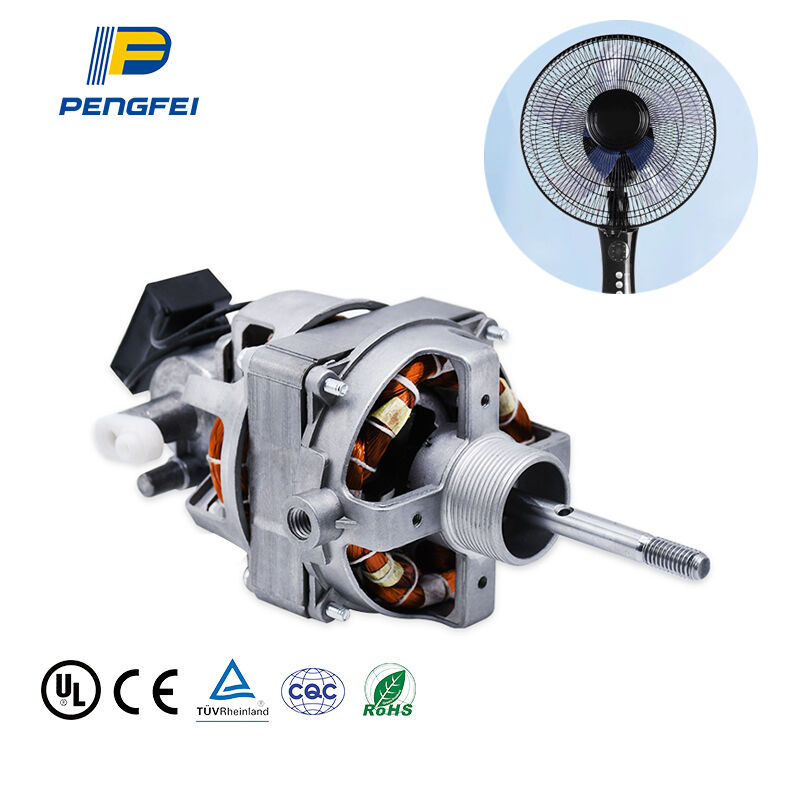
Reconnaître et diagnostiquer les symptômes de défaillance du moteur d’un ventilateur de table
La détection précoce des problèmes moteur est essentielle dans tout Guide d'entretien pour les moteurs de ventilateurs de table système, empêchant ainsi des dysfonctionnements mineurs de s’aggraver jusqu’à causer des dommages irréversibles. Négliger les premiers symptômes peut réduire la durée de vie de votre ventilateur de jusqu’à 60 %, ce qui rend le diagnostic rapide indispensable pour une exploitation économique.
Signes avant-coureurs : bourdonnement, odeur de brûlé, rotation ralentie et fonctionnement intermittent
Surveillez ces quatre indicateurs de défaillance, signes annonciateurs d’un problème imminent au niveau du moteur :
- Bourdonnement ou vrombissement inhabituel , notamment au démarrage, indique souvent une défaillance du condensateur ou un arc électrique interne
- Odeurs persistantes de brûlé révèlent une dégradation de l’isolation due à une surchauffe — généralement provoquée par l’accumulation de poussière, qui fait monter la température au-delà de 82 °C
- Ralentissement progressif de la rotation , même au réglage de vitesse maximale, reflète généralement l’usure des roulements, des fluctuations de tension ou des variations de la résistance des enroulements
- Fonctionnement intermittent aléatoire provient généralement de commutateurs défectueux, de contacts corrodés ou de connexions de câblage endommagées
Diagnostic étape par étape à l’aide d’une inspection visuelle et de tests avec multimètre
Éliminez systématiquement les causes de panne à l’aide de cette méthode de diagnostic :
-
Examen physique sous une lumière vive :
- Recherchez des boîtiers fissurés, des enroulements décolorés ou fragiles, ou une isolation des fils fondue
- Vérifiez que le mouvement des pales est libre et que les vis de fixation sont bien serrées
-
Séquence de vérification avec multimètre :
- Testez la continuité du cordon d’alimentation (résistance attendue : 0–1 Ω)
- Mesurer la résistance d'enroulement (plage normale : 15–30 Ω ; les écarts indiquent des courts-circuits ou des circuits ouverts)
- Vérifier le fonctionnement du condensateur (±10 % de la capacité nominale)
- Confirmer la continuité du commutateur sur tous les réglages
Les pannes de moteur suivent des schémas prévisibles : 80 % des défaillances proviennent soit de roulements usés, soit de la dégradation du condensateur. Le traitement des symptômes dans les 48 heures suivant leur apparition peut réduire les coûts de réparation de plus de 40 % par rapport aux cas négligés.
Pratiques de maintenance proactive pour prolonger la durée de vie du moteur de ventilateur de table
Procédures de nettoyage pour prévenir la surchauffe induite par la poussière et la dégradation de l'isolation
L’accumulation de poussière constitue l’ennemi principal des moteurs de ventilateurs de table, agissant comme une couverture isolante qui retient la chaleur et accélère la dégradation des enroulements. Lorsque la poussière recouvre les composants internes, la température de fonctionnement peut augmenter de 15 à 20 °C — menaçant directement l’intégrité de l’isolation conformément aux lignes directrices de la norme IEEE Std 117 sur les systèmes d’isolation électrique. Pour lutter contre ce phénomène :
- Couper l’alimentation électrique en premier lieu débranchez toujours l’appareil avant le nettoyage afin d’éviter tout risque électrique
- Brossez à sec une fois par semaine utilisez des brosses à poils souples pour éliminer la poussière en surface des pales, des grilles et du boîtier du moteur
- Nettoyage approfondi une fois par mois retirez la protection arrière et aspirez les enroulements à l’aide de l’embout brosse de votre aspirateur
- Entretien des aérations libérez les chemins d’écoulement de l’air à l’aide d’air comprimé (pression inférieure à 30 PSI) afin d’éviter toute obstruction
Portez une attention particulière aux encoches du stator et aux surfaces du rotor, où la poussière compactée peut provoquer des points chauds. Ce protocole permet de prévenir la déstabilisation thermique, une cause fréquente de rupture de l’isolation dans les moteurs asynchrones monophasés.
Lubrification des roulements et de l’arbre : type d’huile, fréquence et recommandations pour une application précise
Une lubrification précise réduit le frottement des roulements jusqu’à 40 %, ce qui prolonge directement la durée de vie du moteur. Pour les roulements à coussinet, courants dans les ventilateurs de table :
| CompoNent | TYPE D'HUILE | Fréquence | Méthode d'application |
|---|---|---|---|
| Palier avant | Huile synthétique ISO VG 22 | Trimestriel | 2 à 3 gouttes par le trou d’huilage |
| ROULEMENT ARRIÈRE | Identique à l’avant | Trimestriel | Essuyer l’arbre, appliquer un fin film |
| Mécanisme de pivot | Huile minérale légère | Annuellement | Application à l’aide d’un coton-tige |
Étapes critiques :
- Faire tourner l’arbre pendant l’application de l’huile afin de répartir uniformément le lubrifiant
- Essuyer immédiatement l’excédent d’huile — une sur-lubrification attire la poussière et dégrade l’isolation
- N’utilisez jamais de graisse ni de WD-40 ; leur viscosité retient les particules et compromet les performances des roulements
Dans les environnements à forte humidité, augmenter la fréquence de lubrification de 50 % afin de contrer l’oxydation induite par l’humidité. Une lubrification adéquate maintient des jeux magnétiques optimaux et empêche l’entraînement parasite du rotor, qui sollicite excessivement les enroulements.
Test et résolution des pannes électriques et mécaniques courantes
Test et remplacement des condensateurs dans les moteurs de ventilateurs de table à courant alternatif monophasé
Les condensateurs défectueux sont à l’origine de plus de 30 % des pannes des moteurs à courant alternatif monophasé dans les ventilateurs de table, se manifestant par des échecs au démarrage ou un fonctionnement irrégulier. Pour diagnostiquer :
- Couper l’alimentation électrique et décharger le condensateur à l’aide d’un tournevis isolé
- Régler le multimètre sur le mode capacité
- Brancher les sondes aux bornes du condensateur et comparer les mesures aux spécifications du fabricant (tolérance de ±10 %)
- Vérifier la présence d’un renflement ou de fuites sur le boîtier, signes d’une défaillance de l’électrolyte
Le remplacement exige une correspondance exacte des valeurs de capacité en microfarads (µF) et de la tension nominale. La précision est essentielle : remplacer un condensateur de 2,5 µF par un condensateur de 3,0 µF augmente la température des enroulements de 15 °C, selon des études sur l’efficacité des moteurs citées dans IEEE Transactions on Energy Conversion . Fixer systématiquement les nouveaux composants à l’aide de supports antivibratoires afin d’éviter la fatigue des fils de raccordement.
Identification et élimination des obstructions mécaniques et des problèmes d'alignement
Les pannes mécaniques proviennent souvent d’un déséquilibre des pales ou de l’usure des roulements, ce qui augmente la charge du moteur jusqu’à 40 %. Diagnostiquez à l’aide des méthodes suivantes :
- Analyse des vibrations : Placez des pièces de monnaie verticalement sur le carter de l’ventilateur — une chute régulière indique un déséquilibre
- Test de rotation : Une rotation manuelle doit se poursuivre pendant 3 secondes ou plus après relâchement
- Inspection auditive : Un grondement indique des roulements à sec ; un cliquetis signale la présence d’objets étrangers
La résolution implique :
- Le réalignement des pales à l’aide d’un niveau à bulle posé sur la surface de fixation
- Le retrait des débris des grilles d’aération à l’aide d’air comprimé (< 30 PSI)
- La lubrification des roulements avec de l’huile synthétique ISO VG 10 appliquée à l’aide d’un applicateur à aiguille
- Redressement de l'arbre à l'aide de jauges à cadran (tolérance maximale de battement de 0,05 mm)
Un balancement persistant après correction nécessite généralement le remplacement du rotor afin d'éviter une dégradation accélérée des enroulements.
Cadre décisionnel Réparation contre Remplacement pour les moteurs de ventilateurs de table
Lorsqu’il faut choisir entre réparer ou remplacer le moteur d’un ventilateur de table, quatre éléments méritent principalement d’être pris en compte : le coût de la réparation, l’âge du moteur, les pannes antérieures qu’il a connues et son rendement énergétique. La plupart des professionnels du secteur s’appuient sur une règle empirique établie par la NEMA (National Electrical Manufacturers Association). Selon cette règle, il est généralement recommandé de remplacer le moteur par un modèle neuf dès lors que le coût de la réparation atteint la moitié ou plus du prix d’un moteur entièrement neuf, surtout si le moteur actuel fonctionne depuis cinq à sept ans ou plus. L’historique de fonctionnement fournit également des indications précieuses : les moteurs qui tombent régulièrement en panne présentent probablement des défaillances internes profondes que des réparations ponctuelles ne sauraient résoudre. L’efficacité énergétique revêt également une importance croissante aujourd’hui : les moteurs récents consomment typiquement de 15 % à 30 % d’électricité en moins que les modèles anciens. Ainsi, même si le remplacement paraît coûteux à première vue, les économies mensuelles sur la facture d’électricité peuvent s’avérer très significatives à long terme. N’oubliez pas non plus les pièces spécifiques : certains moteurs anciens ne sont tout simplement plus fabriqués, ce qui rend leur remplacement particulièrement difficile. Les coûts de main-d’œuvre deviennent alors prohibitifs pour maintenir ces équipements en service. Élaborer un tableau de référence rapide regroupant tous ces critères permet de prendre des décisions plus éclairées, sans se laisser submerger uniquement par les chiffres.
FAQ
Quels sont les premiers signes avant-coureurs d'une défaillance du moteur d'un ventilateur de table ?
Les premiers signes avant-coureurs comprennent des bruits inhabituels de bourdonnement ou d'hum, des odeurs persistantes de brûlé, une rotation progressive ralentie et un fonctionnement intermittent aléatoire.
Comment puis-je diagnostiquer une défaillance du moteur de mon ventilateur de table ?
Vous pouvez diagnostiquer une défaillance du moteur par un examen physique et des tests à l'aide d'un multimètre, en vérifiant la présence de fissures sur le boîtier, en confirmant le mouvement des pales, et en mesurant la continuité du cordon d'alimentation ainsi que la résistance des enroulements.
Quelles pratiques d'entretien peuvent prolonger la durée de vie du moteur de mon ventilateur de table ?
Les pratiques d'entretien préventif comprennent un nettoyage régulier afin d'éviter la surchauffe due à la poussière, une lubrification adéquate des roulements et de l'arbre, et l'assurance de chemins d'écoulement de l'air dégagés.
Comment décider s'il faut réparer ou remplacer le moteur d'un ventilateur de table ?
Prenez en compte le coût des réparations, l'âge du moteur, son historique de pannes et son efficacité énergétique. Si le coût des réparations représente la moitié ou plus du prix d'un nouveau moteur, il est généralement préférable de le remplacer, surtout s'il est ancien ou peu économe en énergie.
Quelles sont les causes des pannes de condensateur dans les ventilateurs de table ?
Les pannes de condensateur sont souvent dues à une défaillance de l’électrolyte, qui peut être diagnostiquée en vérifiant la présence d’un boîtier bombé ou qui fuit, ainsi qu’en contrôlant les valeurs de capacité.
Table des matières
- Reconnaître et diagnostiquer les symptômes de défaillance du moteur d’un ventilateur de table
- Pratiques de maintenance proactive pour prolonger la durée de vie du moteur de ventilateur de table
- Test et résolution des pannes électriques et mécaniques courantes
- Cadre décisionnel Réparation contre Remplacement pour les moteurs de ventilateurs de table
-
FAQ
- Quels sont les premiers signes avant-coureurs d'une défaillance du moteur d'un ventilateur de table ?
- Comment puis-je diagnostiquer une défaillance du moteur de mon ventilateur de table ?
- Quelles pratiques d'entretien peuvent prolonger la durée de vie du moteur de mon ventilateur de table ?
- Comment décider s'il faut réparer ou remplacer le moteur d'un ventilateur de table ?
- Quelles sont les causes des pannes de condensateur dans les ventilateurs de table ?